

One reason why many visit one’s blog, aside from the interesting posts is the appearance of the blog. It should be inviting, easy to navigate and has a good layout. Classic templates offered on blogger don’t usually give too much space and size and some latest applications are not compatible to it. And one great solution for this is to customize your template into a more pleasant to see and more spaces and columns for your third party tools.
Here are the easy steps you must follow. The steps below are basically designed for the newbies and those non newbies but wanted to say goodbye from their classic templates.
1. First, you must download a template you want. Many website offer free blogger templates such as btemplates.com and bloggertemplatesfree.com. Choose the templates that is best suited from your posts and topics you tackle in your blog. Click on the templates you like and you will be directed to another page where you have the option to download or preview the template. If you have decided to use the template, download then save it. The file that will be saved is a zip file of folder. Open the zip folder and look for the file with dot xml (.xml) extension and copy it into a new folder or storage that is easy for you to find. If there is no options to copy the open your ‘My Documents’ folder then drag the xml file into it.
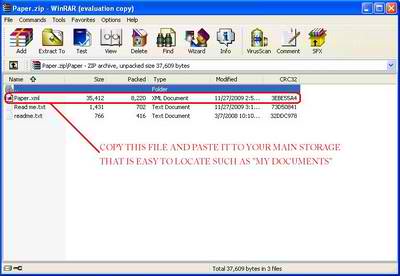
2. Proceed to your Layout tab and make a back-up of all your tools and widgets (html and javascripts) in your side, bottom, or top bar. Copy their respective html/scripts into your notepad or word pad.
3. Under the layout tab, click on Edit HTML sub tab, then click Browse and hit upload. Click confirm and save. A warning will show up but don’t worry if you have lost these tools/widgets. You can still add it anytime since you have a back up from all of it as what is instructed from procedure 2.
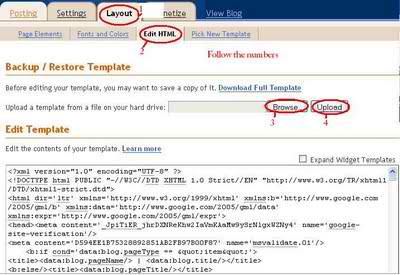
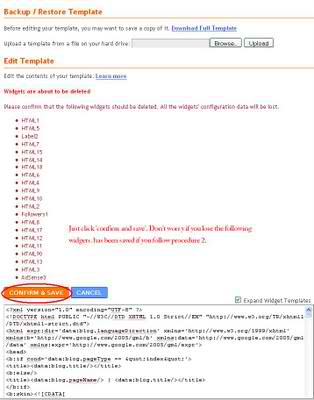
4. Click Save Template bar at the bottom of the page and then your new template is ready. You can go back to your page elements by clicking page elements sub tab under layout tab. Add your widgets again from procedure 2 to your desired column.
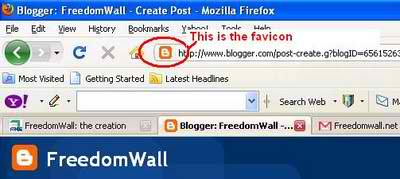
If you like to change your favicon, click here. For those who have previously changed their favicon, you have to repeat the procedure.
If you have some questions about blogger to clear, just leave it in the comment form below. I will do my best to find you an answers. Who knows, someone who may read it might give you the clarifications. You can also subscribe to my email list below to receive updates. Answers may be posted as new articles.



Hi, I do believe this is a great website. I stumbledupon it 😉 I may revisit yet again since i have saved as a favorite it.
Money and freedom is the best way to change, may you be rich and continue to guide other people.
Hello Webmaster, I noticed that https://freedomwall.net/2010/07/blogger-template-customization-made-easy/ is ranking pretty low on Google and has a low Google PageRank. Now the Google PageRank is how Google is able to see how relevant your webpage is compared to all the other webpages online, if you cannot rank high at the top of Google, then you will NOT get the traffic you need. Now usually trying to get to the top of Google costs hundreds if not thousands of dollars and very highly optimized targeted marketing campaigns that takes a team of experts months to achieve. However, we can show you how to get to the top of Google with no out of pocket expenses (free traffic), no stupid ninja tricks, no silly mind control techniques, and this will be all white hat with no blackhat software or tactics that could possibly land you on bad terms with Google and put you in the dreaded “Google Sandbox”. We’ll show you how to easily capture all the targeted traffic you need, for free, multiple ways to land fast (not months) first-page rankings in Google and other major search engines (Bing, Yahoo, Ask, etc), even show you strategies on how to earn daily commissions just try Ranking Top of Google, please check out our 5 minute video.