

Google is the most powerful search engine today. It is where most internet savvies around the world type and click and is ranked no. 1 by Alexa web ranking.
If you have a blog and wanted to create significant visitors to your blog, you must allow Google to crawl and index your blog posts and articles and be searchable. To be able to do this, try using Google Webmaster, a great tool that will automatically inform Google about your blog updates. By this, your articles will be indexed to Google search, making it available to all internet browsers worldwide.
Sign up to Google webmaster tools now. Then start adding your site’s URL (make sure that you have submitted your URL to Google. If not Click here to submit. Take note that it make take up to 5 days for Google search to index your page). You can still proceed adding your site and make sure to verify ownership. You have an option to use a meta tag or by uploading an HTML file to verify. For blogger users, a meta tag is the only option.
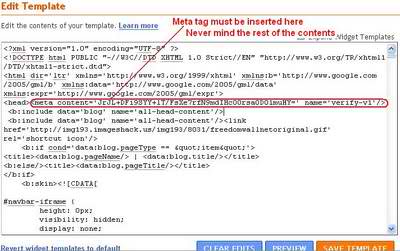
In order to verify your blogger site, copy the meta tag provided. In a separate window or tab, open layout tab in your blogger account and click edit HTML sub-tab. Find this code (you can use Ctrl F) and paste the meta tag provided by webmaster right beside or below the code. The code may appear as shown below.
This may not take effect instantly, but will be very useful for your future posts to be indexed and crawled in Google search. Enjoy blogging, feed others mind and share your ideas to anybody who always wanted to earn new ideas.



Google indexing blog post time is really depending on many things like blog age, sitemap, page rank and backlinks. But aside from these elements I suggest that you focus on your content and Google indexing will no longer be a problem.
Wow,such a valuable information. I will follow this asap.Thank you!
seo philippines
thank you ian