

First, what is Favicon? Favicon, is also known as favorites icon or an icon found beside your URL in your browser (subject to browser compatibility). For blogger users, the Favicon usually appears a bold letter “B” in orange color. But if you wanted to change or personalized with your own, then it is easy.
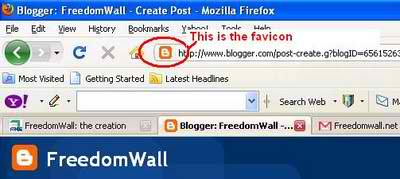
1. You must have your own picture (jpeg & gif formats) preferably equal dimensions on both side or simply a square (if your picture is rectangular, the whole picture may not appear as is or some part may be missing).
2. Host the picture from number 1 and copy the direct link. Several sites offer free photo hosting such as ImageShack®, Photobucket, Picasa, etc. If you want to use your profile pic in facebook, you may right click the pic and select copy image location. If you take the picture from google images, flicker or yahoo photos, you may also right click the image and select copy image location.
4. Press “Ctrl F” and find the code below
[marker]rel=”shortcut icon”[/marker]5. Right below or beside the code above, paste the code below
<link href=”[marker]yourimageURLhere[/marker]” rel=”shortcut icon”/>
6. Your code must look like this
<link href=”[marker]http://img193.imageshack.us/img193/8031/freedomwallnetoriginal.gif[/marker]” rel=”shortcut icon”/>
7. Now you are ready to save your template.


Leave a reply